Scribe Online – Creating your first integration solution for Dynamics 365 CE


In the last post, we created the connection for Dynamics 365 CE

https://nishantrana.me/2019/01/08/getting-started-with-scribe-online-connecting-to-dynamics-365-ce/

Here we will create the integration solution that would consume that connection.

We will take the following simple scenario to understand the basics.

“Delete all the leads with Status = Disqualified”

Let us get started à

Login to Scribe Online

https://app.scribesoft.com

Go to Solution Tab and click on + to create a new solution of type Integration

The solution screen provides the option to define the trigger for the Solution, it could be either on demand or can be scheduled to run once or on recurring basis.
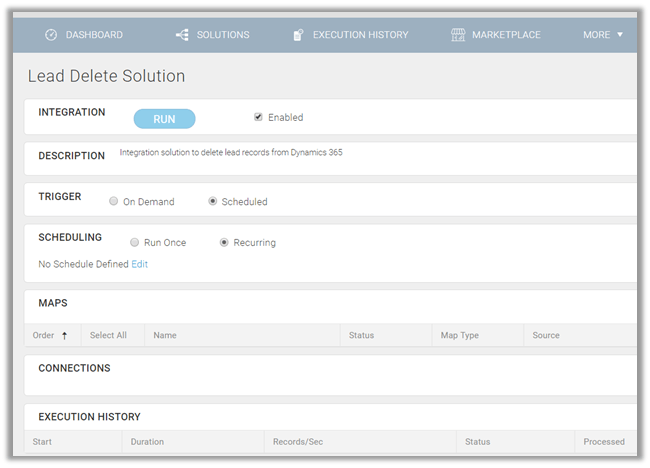
The interface for defining the recurrence

For our example, we are keeping it as on demand.

Next, we need to define the MAPS that holds the processing logic of our Solution. Click on the Create Integration Map option to create the map.

Inside the Map designer, click on Add Connection to add the connection that we created earlier to connect to our Dynamics 365 CE.
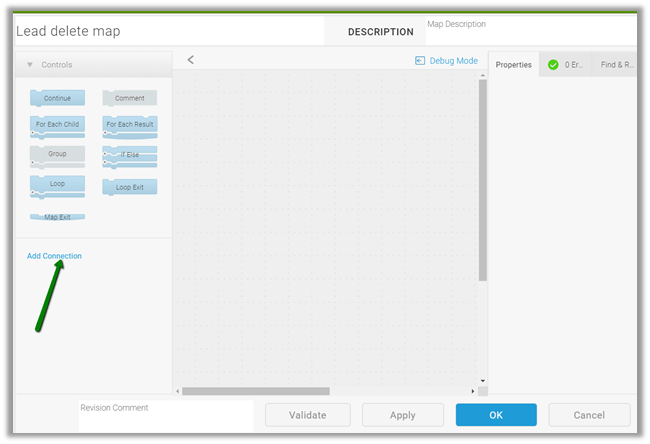
Here we have added our CRM Connection created earlier.

This adds the block for our CRM Connection for various operations that can be performed.

Here we will first add the Query block to retrieve all the leads in the state disqualified, followed by For Each Result block to loop through all the records and Delete block to delete those records.

Drag the Query Block, double click on it
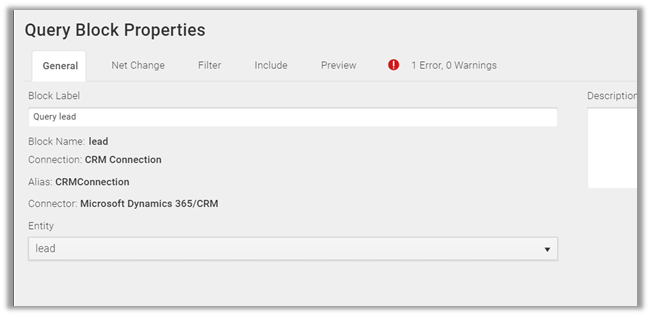
Select Lead as Entity and click on Filter to define the filter condition i.e. statecode equals “Disqualified'”

Next drag For Each Result block below the Query lead block.

Followed by dragging the Delete block inside the For Each Result and double click it.

Specify lead as the entity and click on Matching Criteria tab
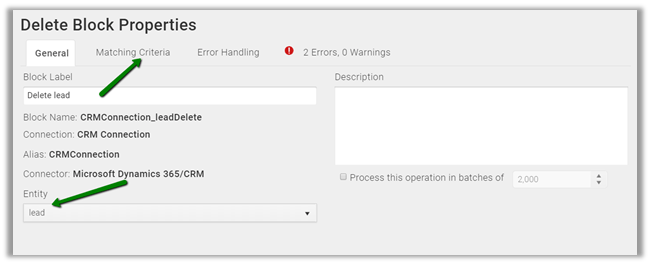
Specify leadid as the field to be used for delete and for Value click on the formula icon

Select the lead as the source and leadid as the field that we would be using from the source Query Block and click on Validate to verify the condition.

Close the Map dialog boxes back in our home pages’ Solutions tab, we will see the status as preparing.

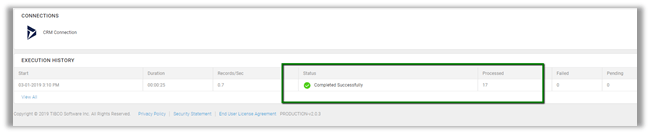
Once prepared we can click on RUN to execute the solution. The execution history will show the details of the run.

After successful completion à
Back in CRM, we can see all the disqualified lead records deleted.

In the next posts, we will try covering other features of the Scribe Online with regards to Dynamics 365 CE

https://nishantrana.me/2019/01/09/scribe-online-create-integration-solution-from-sql-on-premise-to-dynamics-365-ce-online/

Hope it helps..


Discover more from Nishant Rana's Weblog

Subscribe to get the latest posts sent to your email.

Unknown's avatar

Author: Nishant Rana

I love working in and sharing everything about Microsoft.NET technology !

3 thoughts on “Scribe Online – Creating your first integration solution for Dynamics 365 CE”

Please share your thoughts

This site uses Akismet to reduce spam. Learn how your comment data is processed.

Discover more from Nishant Rana's Weblog

Subscribe now to keep reading and get access to the full archive.

Continue reading

Power Platform Puzzles

D365 CRM, Power Platform Tips &Tricks

Power Spark

Power Spark By Shrangarika

Van Carl Nguyen

Exploration of Power Platform

My Trial

It is my experience timeline.

Power⚡Thomas

Sharing my knowledge and experience about the Microsoft Power Platform.

Arpit Power Guide

a guide to powering up community

Welcome to the Blog of Paul Andrew

Sponsored by Cloud Formations Ltd

Deriving Dynamics 365

Deriving Solutions and features on Power Platform/Dynamics 365

The CRM Ninja

Thoughts & musings from a Microsoft Business Applications Ninja!

D CRM Explorer

Learn about Microsoft Dynamics CRM Power Platform customization and implementation and other cool stuffs

Stroke // Jonas Rapp

I know pre-stroke. I will improve who I was.

Power Melange

Power Melange By Shalinee

Clavin's Blog - PPUG.ORG

AI - Power Automate - Power Apps - SharePoint Online - Azure - Nintex - K2 - Artificial Intelligence

Sat Sangha Salon

An Inquiry in Being

The Indoencers

The Influencers & Influences of Indian Music

Monika Halan's blog

Hand's-free money management

D365 Demystified

A closer look at Microsoft Dynamics 365.

Microsoft Mate (msftmate) - Andrew Rogers

Experienced consultant primarily focused on Microsoft Dynamics 365 and the Power Platform

Manmit Rahevar's Blog

One Stop Destination for Microsoft Technology Solutions

MG

Naturally Curious

Brian Illand

Power Platform and Dynamics 365

Steve Mordue

The Professional Paraphraser

Subwoofer 101

Bass defines your home theater

SQLTwins by Nakul Vachhrajani

SQL Server tips and experiences dedicated to my twin daughters.

Everything D365

Discovering Azure DevOps and D365 Business Applications

Tech Wizard

Lets do IT Spells

XRM Tricks (Power Platform & Dynamics CRM )

Power Platform & Dynamics CRM

CRM TIPS BY PRM

Mail to crmtipsbyprm@gmail.com for queries and suggestions

nijos.dev

Giving back to the community what I have learned

Power Platform Learning

Your Go-To Resource for Power Apps, Power Automate & More

xrm CRM Dynamics

Dynamics CRM Technical & Functional Info

Dynamics 365 Blogs - Explained in unique way

Sometimes you need to look at things from different perspective.